
When to Announce a New Job: Timing, Templates, and Etiquette

Learn the best timing, etiquette, and templates for announcing your new job to ensure a smooth transition and professional image.
Announce your new job after your start date or during your first week, and tell your manager and key contacts privately before you post anything public. Offers fall through, start dates shift, and paperwork gets delayed. Posting too early on LinkedIn can force an awkward walk-back if something changes before day one.
Here's what to handle before you write a single caption:
- Confirm your start date, signed contract, and any background check are fully closed.
- Tell your manager, your team, and your top clients privately, in that order, before anything goes public.
- Update your LinkedIn headline, email signature, and profile basics so they're ready the moment you hit publish.
You'll find copy-and-paste templates for LinkedIn, email, and DMs further down, along with a day-by-day timeline for the week you actually make the switch.
Key Takeaways
Announcing a new job works best when private notifications happen first and the public post waits until you have real details to share.
| Point | Details |
|---|---|
| Confirm before you post | Wait for a signed contract and fixed start date before telling anyone beyond your closest circle. |
| Follow the disclosure order | Notify manager, team, clients, and mentors privately before publishing anything public. |
| Time it for your situation | Post on your first day or week for most roles; wait up to 90 days for sensitive or competitive moves. |
| Structure the message | Use a hook, role and company, what excites you, and a clear call to action. |
| Use Nuecareer for prep | Tools like the job description analyzer help translate your new role into clear, shareable language. |
Table of Contents
- Pre-Post Checklist: What to Confirm Before You Announce a New Job
- When Should You Announce Your New Job?
- Who Should You Tell First Before Going Public?
- How to Write a New Job Announcement That Sounds Like You
- LinkedIn Templates for Announcing Your New Job
- Email and DM Templates for Notifying Your Circle
- Dos and Don'ts for Announcing a New Job
- A Week-by-Week Timeline for Your Job Change Announcement
- Polish Your Announcement Before You Post It
- Sources
- FAQ
Pre-Post Checklist: What to Confirm Before You Announce a New Job
Before you touch the "share" button, confirm the hire is actually locked. That means a signed offer letter, a cleared background check if one applies, and a start date that isn't a placeholder. Announcing before the offer is fully confirmed is one of the most common (and most avoidable) mistakes professionals make, since a delayed start or a rescinded offer turns a celebratory post into a retraction. Wait until the paperwork is signed and the date is real before you tell anyone beyond your closest circle.
Once that's settled, work through who needs to know privately first:
- Your current manager and, if relevant, HR.
- Direct reports or close teammates who'll be affected by your departure.
- Key clients or vendors who need advance notice, not a surprise LinkedIn post.
At the same time, quietly get your profile ready: update your work email, confirm the new company's exact name and title, and check your LinkedIn privacy settings so you're not accidentally broadcasting "open to work" the same week you announce a new role.
Pro Tip: Draft your LinkedIn post as a private note in your phone a week before you plan to publish. You'll write a sharper announcement when you're not rushing to hit send between meetings.
When Should You Announce Your New Job?
There's no single right answer here, but there is a right process: match your timing to your situation, not to what feels exciting in the moment.
Before your start date. This works if you're in a low-stakes industry, your current employer already knows you're leaving, and there's zero chance the offer falls through. The upside is you get ahead of rumors. The downside: any delay in your start date turns your announcement into a public correction.
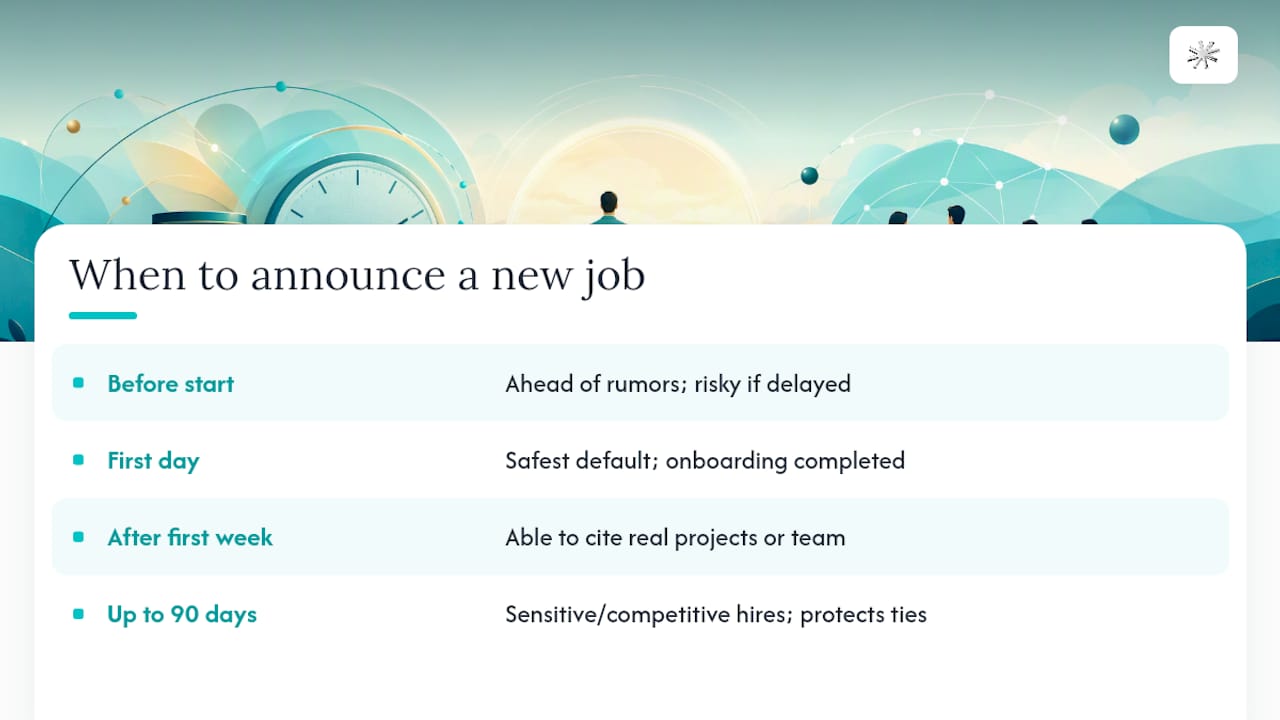
On your first day. This is the safest default for most professionals. You can speak with real experience instead of hypotheticals, and you've already cleared onboarding paperwork that might otherwise complicate things.
After your first week. Ideal if you want to reference actual projects, a team you've met, or something specific about the role. It also gives you breathing room if the first few days reveal anything you'd rather not announce publicly.
Waiting up to 90 days. Reserved for sensitive situations: competitive hires, roles at companies with strict PR policies, or moves where your former employer might react poorly to early news. It's slower, but it protects relationships that matter long term.
Decide based on a few concrete factors: does your new company have a communications policy, are you bound by an NDA, will an early post complicate a client handoff, and how much does personal branding momentum actually matter for your goals right now.
Pro Tip: If you're pivoting industries entirely, waiting until your first week gives you real language to describe the shift instead of guessing at how it will feel.
Who Should You Tell First Before Going Public?
Announcing a new job in the wrong order damages trust faster than almost anything else in a career transition. Follow this sequence:
- Your manager and HR. They need to hear it directly from you, not through a LinkedIn notification, and they'll often guide how client handoffs should be communicated.
- Your direct team. People who worked alongside you deserve a heads-up before a public post, especially if your departure affects their workload.
- Clients or customers. For client-facing roles, coordinate this with your manager and consider a direct email before anything public goes out, since a surprised client is a lost client.
- Mentors and references. People who've vouched for you professionally should hear the news from you first, not secondhand.
- Your broader network. This is where your LinkedIn post or social announcement finally goes live.
If you're managing sensitive client relationships, loop in HR early. They'll flag any confidentiality clauses or handover protocols you might be missing.
How to Write a New Job Announcement That Sounds Like You
A strong announcement follows a simple four-part structure, whether you're writing for LinkedIn, email, or a quick DM.
1. The hook. Open with something other than "I'm excited to announce." A specific detail (the problem you'll be solving, the team you're joining) pulls readers in faster than a generic opener.
2. Role and company. State the title and company clearly and early. Don't make people hunt for it.
3. What you're looking forward to. One sentence about the work itself, not vague enthusiasm. "I'll be leading product analytics for a team of 40" beats "so excited for this new adventure."
4. Gratitude and a call to action. Thank the people who helped you get here, and close with something actionable: an invitation to connect, a note about what you're working on, or contact information for people who need it.
Tone shifts depending on who's reading. With colleagues, you can be warm and specific. With clients, stay professional and forward-looking, and skip anything that sounds like you're soliciting business away from your old employer. With your broader network, keep it positive and light on internal details nobody outside the company needs.
- Senior hires often add one line about the mandate or team size they're stepping into.
- Individual contributors can lean more personal, referencing the skills or interests driving the move.
Pro Tip: Read your draft out loud before posting. If it sounds like a press release, cut it down until it sounds like you talking to a colleague.
LinkedIn Templates for Announcing Your New Job
LinkedIn rewards short, personal posts over polished corporate copy. A narrative post from your personal profile consistently outperforms company-page announcements for organic reach, so lead with your own voice.

Short and simple: "New title, new team: I'm joining [Company] as [Role] starting [date/this week]. Grateful for everyone who helped along the way."
Standard (2 to 3 sentences): "I'm thrilled to share that I've joined [Company] as [Role]. I'll be focused on [specific project or team], and I couldn't be more excited to get started. Huge thanks to everyone who supported me through this transition."
Storytelling hook: "A year ago, I didn't think I'd end up here. This week, I started as [Role] at [Company], where I'll be tackling [specific challenge]. Looking back, the biggest lesson was [short insight]. Excited for what's next, and always happy to connect with anyone navigating a similar shift."
For images, a personal photo (headshot or a candid first-day shot) outperforms a stock company logo for engagement. If you use a company-provided graphic, add alt text describing the role and company so the post is accessible to screen-reader users. Tag your new company once it's public information, and keep hashtags to two or three relevant ones (#NewRole, #CareerChange) rather than a long list that reads as spam.
Well-structured narrative posts can generate up to 6x more profile views in the weeks after posting, according to one analysis, though results vary by network size and industry. Timing matters too: posting Tuesday through Thursday, mid-morning or early afternoon in your target time zone, tends to catch more of the algorithm's initial engagement window.
Email and DM Templates for Notifying Your Circle
Not every announcement belongs on LinkedIn. Some conversations need a direct, personal message first.
Manager/HR handover note: "Hi [Name], I wanted to give you an update ahead of my transition. I'll be starting at [Company] on [date]. I'm happy to help however I can with the handover before then."
Client notification: "Hi [Name], I wanted to personally let you know I'll be moving into a new role starting [date]. [Colleague name] will be your main point of contact going forward, and I'll make sure the transition is smooth."
Goodbye/thank-you to the team: "Working with this team has meant a lot to me. As some of you know, I'm moving on to a new opportunity starting [date]. Thank you for everything, and let's stay in touch."
Keep subject lines simple: "An Update on My Next Chapter" or "Moving On, Staying in Touch" both work well. Send client emails during business hours, and only use your new work email once you've actually started. For quick Slack or Teams messages to close colleagues, a short version of the goodbye note works fine, and a well-written introduction email can help you reconnect with mentors you haven't talked to in a while.
Dos and Don'ts for Announcing a New Job
The most common mistake isn't tone. It's timing and oversharing.
Do: keep the tone positive, thank former colleagues by name where appropriate, update your profile before your post goes live, and loop in your manager or HR if you're unsure how much to share.
Don't: mention salary figures, criticize your former employer even lightly, solicit former clients in a way that could breach a non-solicitation agreement, or post before your start date is locked in.
Before you publish anything, run through a short legal check: review any NDA language from your previous role, confirm how your new employer wants client transitions handled, and ask HR directly if you're unsure whether a detail is safe to share. A structured hiring post that stays transparent about role and scope, without oversharing internal details, consistently earns more trust than a vague, generic announcement.
A Week-by-Week Timeline for Your Job Change Announcement
Here's a compact plan that covers the full transition window:
- Week before start: confirm paperwork, tell your manager and HR privately, and draft your LinkedIn post.
- Day 0 (last day at old job): send goodbye notes to your team and any clients you've personally handled.
- First week at new job: update your LinkedIn title and company, publish your post, and reply to early comments as they come in.
- 30 days in: revisit your profile bio to reflect what you're actually doing, not just your title.
- 90 days in: if you delayed announcing for sensitive reasons, this is a natural checkpoint to go public.
If your situation is sensitive, a limited-tag post (visible to connections only, without tagging the company) is a reasonable middle ground.
How a Career Platform Can Help You Prep Your Announcement
A career platform speeds up the unglamorous prep work: auditing your headline, tightening your bio, and generating wording you'd otherwise draft from scratch. Tools like a job description analyzer can also help you translate your new role's responsibilities into language that reads naturally in a public post rather than job-posting jargon.
Pro Tip: Preview your LinkedIn post on mobile before publishing. Line breaks that look clean on desktop often bunch up awkwardly on a phone screen.
Why Timing Beats Enthusiasm
Most people announce a new job the moment they feel excited, not the moment it's actually safe to do so. In practice, waiting until your first day or week almost always produces a better post: you have real details to share, and you've avoided the risk of walking back a premature announcement. The exceptions (competitive hires, NDA-bound roles, sensitive internal politics) are real, but they're exceptions, not the default.
Polish Your Announcement Before You Post It
Getting the timing right is half the job. The other half is making sure your profile, your bio line, and your wording actually sound like the professional you're becoming, not a rough draft. Nuecareer's free tools handle the parts most people skip: a job description analyzer that turns your new role's responsibilities into clear, public-friendly language, and a career clusters quiz if you're still figuring out how to frame a bigger career pivot in your post.
If you're already questioning whether this move is the right long-term fit, or you're planning your next one, it's worth running your target role through the quiz before you finalize your announcement copy. It takes minutes, and it gives you language you can actually use in your LinkedIn post instead of guessing at how to describe the shift.
Sources
- How to Announce Your New Job on LinkedIn | Coursera
- New job announcement email message and letter examples - The Balance
- Autoposting
- How to Write a LinkedIn Hiring Post (+7 Examples and Free Tool to Test Your Own) — AuthorEdUp
FAQ
How do I announce starting a new job?
Confirm your signed contract and start date, tell your manager and key contacts privately, then publish a short LinkedIn post once you've started or finished your first week.
How do I announce a new job on social media?
Lead with a personal, narrative-style post from your own profile rather than relying on a company page, since personal posts tend to outperform company posts for organic reach.
What is a good message for a new job announcement?
A strong message includes a hook, your new title and company, one specific thing you're looking forward to, and a note of gratitude, kept to two or three sentences for feed performance.
What should I caption a new job post?
Keep it short and specific: name the role, the company, and one concrete detail about the work, then close with a simple thank-you or invitation to connect.
Can tools like Nuecareer help me write my announcement?
Yes. Nuecareer's job description analyzer helps translate your new responsibilities into clear, public-friendly wording you can drop straight into a post or bio.