

Start with a disciplined spreadsheet if you have fewer than 10 active applications, and move to a dedicated tracker once volume, missed follow-ups, or manual copy-paste start eating your time. The one habit that matters more than any tool: save the job posting URL and set a next-follow-up date the moment you apply. A copy-paste template and clear upgrade signals follow below.
TL;DR:
- Using a spreadsheet for application tracking works well for fewer than 10 active jobs, but larger volumes benefit from automated tools with reminders and analytics.
- Key fields include URL, application and follow-up dates, status, resume version, and next follow-up date, which helps maintain workflow visibility and responsiveness.
- Upgrading from a spreadsheet to a dedicated tracker is advisable when applications exceed 10, follow-up reminders are missed, or duplicate applications occur frequently.
- Regularly updating the tracker weekly with new applications, follow-ups, and response metrics prevents missed opportunities and helps diagnose search effectiveness.
- A job search strategy should start with clarifying target roles through tools like the 7-Minute Career Quiz before logging applications to ensure efforts are focused on well-fitting opportunities.
Table of Contents
- Should You Track Job Applications With a Spreadsheet or an App?
- Building a Job Search Spreadsheet That Actually Works
- When Should You Upgrade From a Spreadsheet to a Tracker?
- Turn Your Tracker Into a Weekly Habit
- Use Your Tracker to Diagnose What's Actually Working
- Customizing Your Tracker for Different Job Types
- How to Prioritize Applications Inside Your Tracker
- Keeping Your Personal Data Safe in a Job Tracker
- Popular Job Application Tracking Tools Compared
- What NueCareer Thinks Actually Moves the Needle
- Get a Clearer Target Before You Track a Single Application
- Sources
- FAQ
Should You Track Job Applications With a Spreadsheet or an App?
The right tool depends on volume, not preference. A spreadsheet gives you full control, costs nothing, and keeps your personal data off a third-party server. A dedicated tracker trades some of that control for automation: browser capture, reminders that fire on their own, and analytics you'd otherwise calculate by hand.
Industry guidance from Robert Half's job market research puts the practical cutoff around 10 concurrent applications. Below that, a spreadsheet is genuinely faster to set up and maintain. Above it, the manual upkeep starts costing more time than the tool would save you.
Here's how the tradeoffs actually break down:
- Effort: Spreadsheets need manual entry every time; trackers can auto-capture from job boards with a browser extension.
- Cost: Spreadsheets are free forever; trackers often gate automation and analytics behind a paid tier.
- Privacy: Spreadsheets in your own Google Drive keep data under your control; trackers store your information on their servers.
- Analytics: Spreadsheets require you to build your own formulas; trackers calculate response and interview rates automatically.
If you're not sure which camp you're in, count your open applications right now. That number is your answer.
Building a Job Search Spreadsheet That Actually Works
A good tracker isn't complicated. It just needs the right columns, set up once, so you never have to think about structure again while you're focused on applying.
Here's what to include and why each field earns its place:
- Job title and company — the obvious identifiers, but keep them in separate columns so you can sort and filter by employer.
- Job URL — postings vanish constantly once filled. Save the link immediately; you'll need the original description later for interview prep.
- Date found and date applied — two different dates. The gap between them tells you how quickly you're moving on leads.
- Status — use a fixed dropdown: Applied, Screening, Interview, Offer, Rejected, Withdrawn. Consistency here is what makes the sheet analyzable later.
- Resume version — which file you sent. This becomes critical once you start tailoring for different roles.
- Next follow-up date — the single most important column in the entire sheet. Set it every time something happens.
- Interview dates and outcome — a running record for your own reference and for future negotiation leverage.
- Notes — recruiter names, salary discussed, culture impressions, anything you'd forget in three weeks.
Free templates already built around this structure exist, with example rows and column explanations you can copy directly. A multi-tab Google Sheets template can add a Dashboard tab that calculates your response rate automatically and a conditional-formatting rule that highlights any row where the follow-up date has passed. In Excel, the same logic works with a simple IF formula comparing today's date against your follow-up column. Both platforms handle this without any add-ons.
Pro Tip: Duplicate the "Applied" status into a separate color the moment you submit. A quick visual scan of your sheet should tell you your pipeline shape in under five seconds.
When Should You Upgrade From a Spreadsheet to a Tracker?
Four signals mean it's time to switch: you're juggling more than 10 active applications, you've missed a follow-up because it got buried in a scroll, you're copy-pasting the same job details across three different documents, or you keep applying to the same posting twice without realizing it.
Dedicated trackers solve these problems directly:
- Browser extension capture pulls job details automatically when you're on a posting, cutting entry time to seconds.
- Automated reminders ping you on follow-up day instead of relying on your memory or a calendar you forgot to check.
- ATS-match scoring flags how well your resume aligns with a posting's keywords before you hit submit.
- Duplicate detection catches reposted listings so you don't waste a second application on the same role.
Robert Half's research notes that AI is already reshaping how employers screen and schedule candidates, which makes it tempting to assume more automation on your end is always better. It isn't automatically. A tracker should save you time on logistics, not replace the tailored research that actually gets you interviews.
If you're trialing a paid tool, start on the free tier, confirm you can export your data as a CSV before committing, and check the privacy policy for how long they retain your information after you delete an account.
Turn Your Tracker Into a Weekly Habit
A tracker only works if you actually update it. Build this into a short, repeatable rhythm rather than treating it as a one-time setup task.
- Log every new application the day you submit it, including the job URL, and set a next-follow-up date before you close the tab.
- Follow up 7 to 10 business days after applying if you've heard nothing, a timing window supported by career-coaching consensus. Send interview thank-you notes within 24 hours, and if a recruiter gives you a timeline, follow up two business days after it passes.
- Clear overdue items first each time you open the sheet. An overdue follow-up left unaddressed is often the difference between a live candidacy and a dead one.
- Review four numbers weekly: applications logged, response rate, interview rate, and offer rate. A response rate under 5% usually points to targeting or resume problems, not bad luck.
Career coaches consistently flag missed follow-ups, not weak interviews, as the more common reason strong candidates lose opportunities. The tracker's job is to make that failure mode structurally difficult.
Use Your Tracker to Diagnose What's Actually Working
Your resume version column isn't just record-keeping. It's the raw data for figuring out which version of your materials actually converts.
Add an ATS match score to each row, either from a checker tool or a manual count of how many keywords from the posting appear in your resume. Templates built for this purpose recommend tracking resume version alongside match score specifically so you can compare outcomes later.
Run a small experiment: send 20 applications with heavy tailoring and 20 with your standard resume, then compare callback rates between the two groups. If tailored versions consistently pull more responses, that's your answer on where to spend your time. If the gap is negligible, the problem is more likely your targeting than your resume, and no amount of extra tailoring will fix it.
Customizing Your Tracker for Different Job Types
A generic tracker works fine for most searches, but a few tweaks make it sharper depending on what you're pursuing.
If you're applying to contract or freelance roles, add a column for hourly rate or project budget alongside your usual status field. Rate negotiation happens earlier in these conversations than it does for salaried roles, and you'll want that history visible.
For tech and engineering roles, an ATS-match-score column earns its keep, since applicant tracking systems in that space lean heavily on keyword parsing. Pair it with a "referral source" field. Referred candidates in technical hiring often skip screening steps entirely, and you'll want to know which network contacts are actually producing results.
If you're pursuing career-change roles outside your current field, add a "transferable skill highlighted" column. Note which specific skill you emphasized for each application. Some transferable skills will resonate with hiring managers and some won't, and you won't know which until you compare outcomes across a dozen or more applications.
For government or highly structured hiring processes, add a column for the exact posting closing date and required application ID or reference number. These processes often move on fixed timelines with no flexibility, and losing track of a reference number can mean starting the paperwork over.
Freelancers, career changers, and technical candidates are all running fundamentally the same tracking system. They're just weighting different columns based on what actually predicts their outcomes.
How to Prioritize Applications Inside Your Tracker
Not every open role deserves equal attention, and a tracker that treats them identically will bury your best opportunities under a pile of long-shot applications.

Add a simple priority field, ranked high, medium, or low, based on three factors: how well your background matches the role, how recently the posting went live, and whether you have any connection to the company. A posting that went up two days ago with a strong skills match and a warm introduction from a former colleague should outrank one that's been live for three weeks with no personal connection.
Sort your active pipeline by priority every time you sit down to work through follow-ups. High-priority applications get faster follow-up turnaround and more customized outreach. Low-priority applications, the ones you applied to as a volume play, can sit on the standard follow-up schedule without extra effort.
Revisit priority ratings weekly, not just at the point of applying. A medium-priority role can jump to high the moment you get a screening call, and a high-priority one can drop if you learn the role was internally filled. Building a strategic job search around priority, rather than chronology, keeps your energy pointed at the applications most likely to convert.
Keeping Your Personal Data Safe in a Job Tracker
Your tracker holds more sensitive information than it looks like at first glance: salary history, references' contact details, sometimes even notes on personal circumstances you mentioned to a recruiter. Treat it accordingly.
If you're using a spreadsheet, keep it in a personal cloud drive with two-factor authentication enabled, rather than a shared or work computer. Avoid storing full Social Security numbers or bank details in any tracking sheet. There's rarely a reason those need to live alongside your job search notes, and a spreadsheet is not the secure storage those numbers require.
If you're using a dedicated tracker app, check its privacy policy before uploading a resume with your address and phone number. Confirm you can export your full data and delete your account cleanly if you stop using the service. A Google Sheets template stored in your own Drive generally offers more control than a third-party tracker, since you own the file outright and no outside company retains a copy.
Either way, review sharing permissions periodically. It's easy to forget you shared a tracker link with a friend for feedback months ago, and that link may still be live.
Popular Job Application Tracking Tools Compared
Dedicated trackers generally fall into a few categories, each with real tradeoffs worth understanding before you commit.
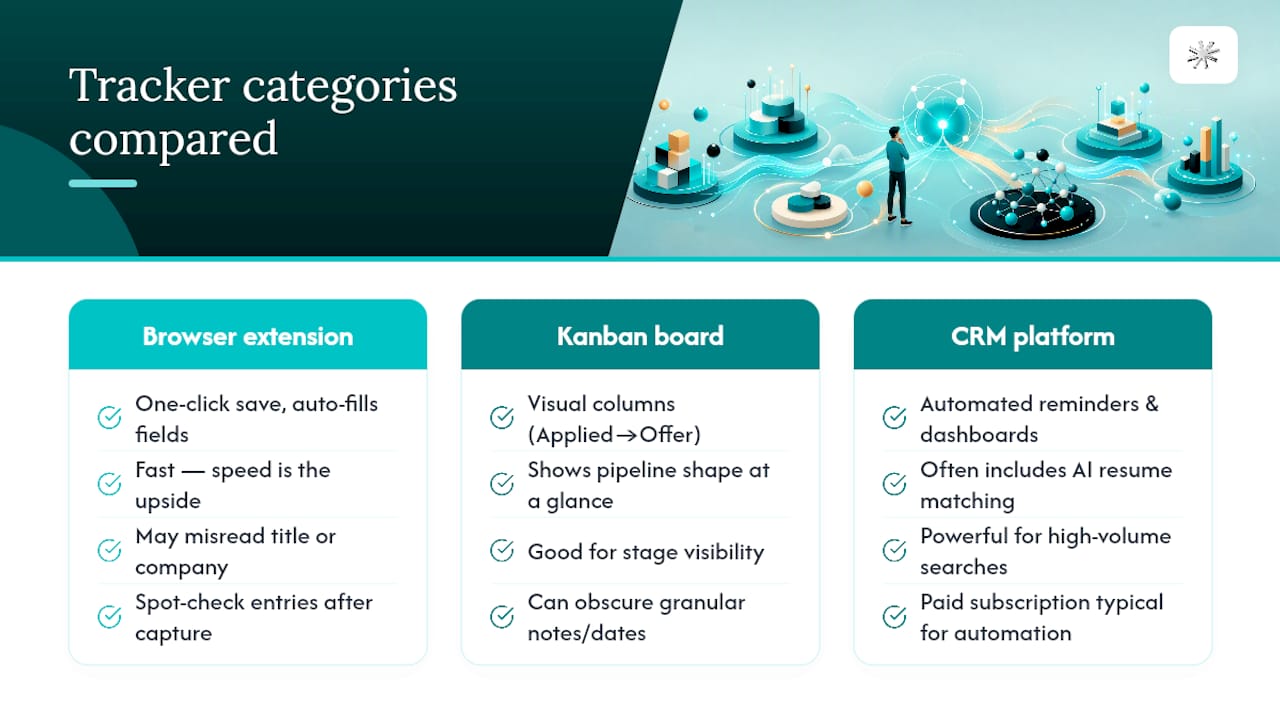
Browser-extension capture tools let you save a posting with one click while you're on the job board itself, auto-filling company, title, and URL. The upside is speed. The downside is that the automatic capture sometimes misreads job titles or pulls the wrong company name from a staffing agency's posting, so you'll still need to spot-check entries.
Kanban-style board trackers display your pipeline as visual columns, moving each application card from Applied to Interview to Offer. This format makes your overall pipeline shape easy to see at a glance, but it can obscure the granular notes and dates a spreadsheet handles more naturally.
Full CRM-style platforms add automated reminders, analytics dashboards, and sometimes AI-assisted resume matching. These are the most powerful option for high-volume searches, but they typically require a paid subscription for the automation features, and the learning curve is steeper than opening a spreadsheet.
Whichever category you choose, weigh the automation gain against the cost and the data you're handing over. For most job seekers running under 20 active applications, the manual control of a spreadsheet still outperforms the convenience of an app.
What NueCareer Thinks Actually Moves the Needle
Most advice on tracking job applications treats the tracker as the whole solution. It isn't. A perfectly maintained spreadsheet with zero missed follow-ups won't fix a search where you're applying to the wrong roles in the first place. Tracking tells you where your funnel breaks, but it can't tell you whether you're aimed at the right target to begin with.
That's the gap Nuecareer was built to close. A tracker is a record of what you're doing. A career roadmap tells you what you should be doing, and that distinction gets lost in almost every article written on this subject, including the ones that get the mechanics of spreadsheet columns exactly right.
The 7-Minute Career Quiz exists because the highest-leverage fix for a stalled search usually isn't a better follow-up cadence. It's clarity on which roles actually fit your strengths before you start logging rows in a spreadsheet at all. Track your applications diligently. Just make sure you're tracking the right ones.
— Shane
Get a Clearer Target Before You Track a Single Application
A spreadsheet only tells you what happened after you apply. It can't tell you whether you're aiming at the right roles before you start. That's the gap Nuecareer's 7-Minute Career Quiz closes: it clarifies which roles actually fit your strengths and experience, so every row you log in your tracker represents a genuinely well-targeted application instead of a volume play.
Once you have a clearer target, Nuecareer's resume and cover letter tools help you tailor materials fast enough to keep pace with your tracker's follow-up schedule, and the platform's coaching chat is available if you get stuck on strategy between applications. None of this replaces your spreadsheet. It just makes the applications you're tracking count for more. Take the quiz, get matched to roles built around your actual strengths, and start applying with a plan instead of a guess.
Sources
- Job Market Outlook — Robert Half
- Job search spreadsheet — Indeed career advice
- Free job search tracker Google Sheets — Tools Without Code
FAQ
What Is the Best Way to Track Job Applications?
For fewer than 10 active applications, a spreadsheet with fixed status stages and a next-follow-up-date column works best. Beyond that volume, a dedicated tracker with automated reminders and duplicate detection saves more time than it costs.
How Can I Track My Job Application Status?
Use a fixed dropdown list, Applied, Screening, Interview, Offer, Rejected, Withdrawn, and update it immediately after every contact with an employer. This single habit is what turns a static list into a usable pipeline.
What Is the 70/30 Rule in Hiring?
There's no single agreed-upon definition of a "70/30 rule" in hiring, and no authoritative source establishes one standard version. Rather than guess at a framework, focus on what's actually measurable: your response rate, interview rate, and offer rate, tracked weekly.
Is Tracking Job Applications Worth It?
Yes. Missed follow-ups are a more common cause of lost opportunities than weak interview performance, and a tracker's next-follow-up-date field is specifically designed to prevent that drift. It also converts your search into diagnostic data you can act on instead of guesswork.