

An ATS-friendly resume is one that an applicant tracking system can accurately read, sort, and rank without losing your contact details, work history, or skills in translation. The single biggest fix: build it in a machine-readable, single-column layout with standard section headings, your contact information in the body (never a header or footer), and export it as a proper .docx or text-based PDF.
That single change resolves most parsing failures we see. A large majority of large employers now screen candidates through an ATS before a human ever opens the file, and many qualified people get filtered out purely on formatting or keyword mismatches, not skill gaps.
Run this test right now: select your entire resume, copy it, and paste it into a plain text editor like Notepad or TextEdit.
- If your name, job titles, dates, and bullet points appear in a clean, readable order, you're in decent shape.
- If text is jumbled, missing, or out of sequence, the ATS is likely seeing the same mess.
Key Takeaways
An ATS-friendly resume works because it pairs a single-column, machine-readable layout with job-specific keywords placed where parsers weight them most heavily.
| Point | Details |
|---|---|
| Fix formatting first | Use single-column layout, standard headings, and contact info in the body, not headers or footers. |
| Run the copy-paste test | Paste your resume into a plain text editor to catch parsing breaks before you apply. |
| Mirror job description language | Use both acronyms and full terms, and pull 5 to 8 keywords straight from the posting. |
| Export correctly | Save as .docx or a text-based PDF, and confirm you can highlight the text. |
| Use Nuecareer's quiz and tools | The 7-Minute Career Quiz and free ATS resume checker help target roles and validate your resume fast. |
Table of Contents
- Quick ATS-Friendly Resume Checklist You Can Run in 5 Minutes
- How to Convert Your Existing Resume Into an ATS Resume Format
- Which Resume Templates Are Safe for ATS, and How to Export Them
- Where Should ATS Keywords Go on a Resume?
- Common ATS Parsing Errors and Fast Fixes
- How NueCareer Helps You Build an ATS-Ready Resume
- Authoritative Reads and Tools to Check Your Resume
- An Editorial Take on What Actually Moves the Needle
- Try NueCareer's Career Quiz and Resume Tools
- Sources
- FAQ
Quick ATS-Friendly Resume Checklist You Can Run in 5 Minutes
Before you touch a single bullet point, sweep your document for structural problems. Most rejected resumes fail here, not on content.
- Layout: One column, no tables, no text boxes, no sidebars.
- Fonts and sizing: Stick to Arial, Calibri, or Georgia at 10 to 12 point body text; headings no larger than 14 or 16 point.
- Margins: Keep them between 0.5 and 1 inch. Tighter margins can cause parsers to truncate lines.
- Contact info: Name, phone, email, and city/state go in the main body, top of the page, never in a header or footer.
- No graphics: Remove headshots, icons, logos, and decorative lines.
- Standard headings: Use "Professional Summary," "Experience," "Skills," and "Education," not creative substitutes like "Where I've Been."
- Inline dates: Employment dates sit on the same line as the job title and company, not in a separate column.
- File format: Save as .docx or a text-based PDF you can confirm by trying to highlight the text.
Pro Tip: Keep a "master" plain-text version of your resume saved separately. When a job posting looks glitchy on upload, you'll have a backup you know parses cleanly.
How to Convert Your Existing Resume Into an ATS Resume Format
Start by stripping your current resume down to a plain skeleton: name and contact info, professional summary, skills, experience, education. That order matters because most parsers weight the top third of the document more heavily, so your strongest keywords should live in the summary and skills block, not buried on page two.
Once the skeleton is in place, rewrite each bullet point as a compact achievement statement that names the tool, the action, and the result.
Mirror the job posting's own language where it's accurate. If the listing says "project management," don't substitute "coordinated initiatives" just to sound different. When a posting uses an acronym, include both forms once: "PMP (Project Management Professional)" catches searches for either version without repeating the term three times.
For dates, use a consistent format throughout: "Jan 2022 – Mar 2024," on the same line as the job title and employer. Inconsistent formats (some spelled out, some abbreviated, some in different orders) confuse the tenure calculations some systems run to filter by years of experience. If you have older roles from more than 10 to 15 years back, condense them into a short "Additional Experience" line rather than full bullet treatment.
Finally, validate your edits:
- Run the copy-paste test again after every major revision.
- Use a free ATS resume checker to confirm your document still parses cleanly after formatting changes.
Which Resume Templates Are Safe for ATS, and How to Export Them
Plenty of visually striking resume templates will actively work against you. Sidebars, multi-column layouts, icons next to your phone number, and text boxes around your name all commonly cause parsers to scramble or drop content entirely. If a template relies on any of those elements, either skip it or strip them out before you fill in your details.
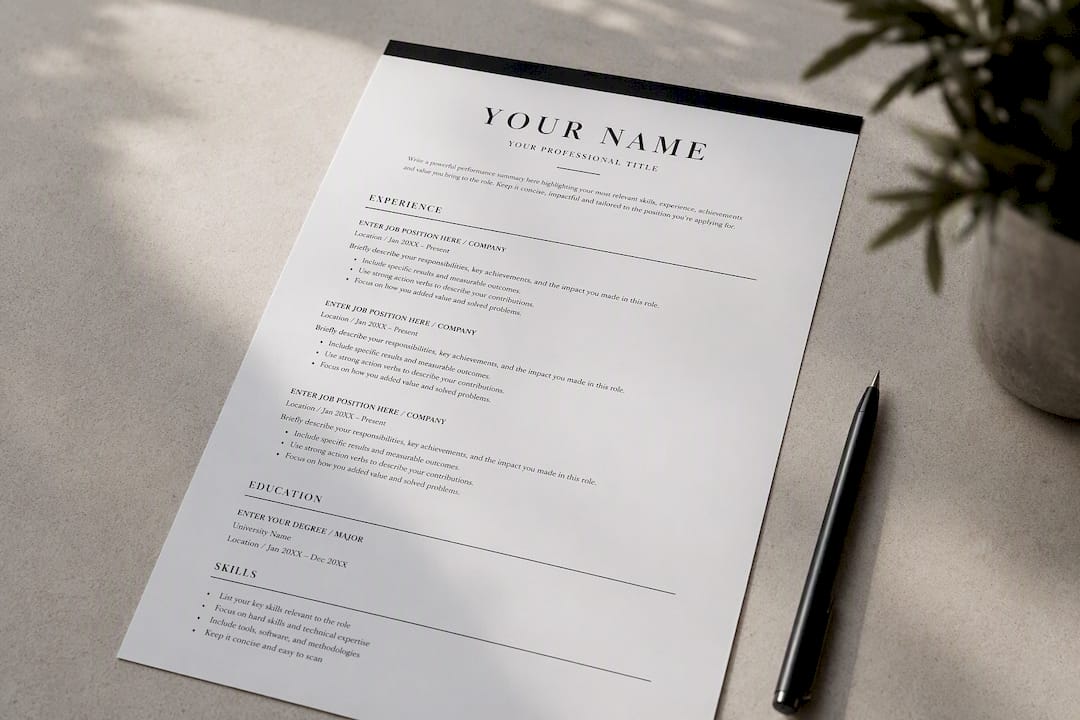
If you love a template's fonts and spacing but it has a sidebar for skills or contact info, move that content into the main single-column flow and delete the visual container. The words matter to an ATS; the box around them does not. Microsoft offers a set of ATS-friendly templates built specifically to avoid these traps, which is a reasonable starting point if you'd rather not rebuild a layout from scratch.
For export, .docx tends to parse most reliably across systems, though a text-based PDF works fine too, as long as it's not a scanned image. Confirm any PDF export by opening it and trying to highlight a sentence. If you can select and copy the text, it's readable. If nothing highlights, the file is an image and needs to be rebuilt or re-exported.
In Word, use "Save As" and choose Word Document (.docx) or PDF, never "Print to PDF" from a scanned copy. In Google Docs, use File > Download > Microsoft Word (.docx) or PDF Document, both of which preserve selectable text by default. For more on choosing a layout that works across formats, see our resume format guide.
Where Should ATS Keywords Go on a Resume?
Parsers weight certain sections more heavily than others, and knowing that hierarchy changes where you spend your editing time. Your professional summary and skills section typically carry the most weight, followed by your experience bullets. A short, role-targeted summary that mirrors two or three of the job posting's top requirements does double duty: it feeds the algorithm and gives a human reader an instant sense of fit.
Getting through the ATS gate is only step one, though. Once your resume is machine-readable, the actual content still has to match the job, which means real tailoring beats a generic keyword dump every time.
To choose keywords without guessing, pull the top 5 to 8 skills or terms that repeat across the job posting itself, not from a generic industry list. Look for the exact phrasing in the requirements and responsibilities sections, then work those words into your summary, skills list, and at least one bullet each.
- Weak bullet: "Worked with data to help the marketing team."
- ATS-optimized bullet: "Analyzed campaign performance data in Google Analytics and HubSpot to guide a marketing team of 6, increasing qualified leads 22% quarter over quarter."
The second version names tools, quantifies the result, and reflects language a hiring manager likely used in the posting.
Pro Tip: Keep a running list of every keyword you add for a given application. When you get an interview, you'll already know exactly which terms caught the recruiter's eye.
Common ATS Parsing Errors and Fast Fixes
A handful of mistakes account for most parsing failures, and nearly all of them are quick to correct once you know what to look for.
- Contact info in a header or footer: Move your name, phone, and email into the top of the main body. Many parsers ignore header and footer regions entirely, and a resume can get flagged for missing contact details even when a human would spot them instantly.
- Images, icons, or logos: Delete them. Parsers can't read a graphic, and any text embedded in an image disappears completely.
- Tables or multi-column layouts: Rebuild in a single column. Tables often get read out of order, scrambling your job titles and dates.
- Unusual bullet glyphs or decorative fonts: Stick to standard round or square bullets and a common font family; symbol-based bullets sometimes render as garbled characters.
- Scanned or image-based PDFs: Re-export directly from Word or Google Docs rather than scanning a printed copy. If you can't highlight text in the PDF, it's not readable by machine.
How NueCareer Helps You Build an ATS-Ready Resume
Formatting is only half the battle. Knowing which keywords actually matter for your target role is the other half, and that's where most people get stuck. The 7-Minute Career Quiz narrows down which roles fit your strengths, which makes keyword selection far less of a guessing game because you're writing toward a specific target instead of a vague direction.
From there, Nuecareer's resume tools handle the heavy lifting:
- Resume summary examples to build a keyword-rich opening in minutes.
- Objective writer for career changers who need to reframe transferable skills.
- Action verbs by category to replace flat language with achievement-focused phrasing.
- Free ATS resume checker to confirm your document parses cleanly before you submit it anywhere.
| Tool | What It Solves |
|---|---|
| 7-Minute Career Quiz | Narrows target roles so keyword choices are specific, not generic |
| Resume summary examples | Gives you a fast, tailored opening statement |
| Action verbs by category | Replaces weak phrasing with concrete achievement language |
| Free ATS resume checker | Confirms your file actually parses before you apply |
This guide was written by Shane, drawing on Nuecareer's work helping job seekers rebuild resumes that pass both the machine and the recruiter.
Authoritative Reads and Tools to Check Your Resume
- Columbia Career Education's ATS guide covers the formatting and tailoring fundamentals in depth.
- Microsoft's ATS-friendly templates offer a safe starting layout if you want a built-in structure.
- Indeed's ATS resume guide walks through formatting and keyword tailoring with sample templates.
- For tailoring language to a specific posting, see this guide to customizing your resume per job.
- Nuecareer's free career tools let you check and refine your resume before you submit it.
An Editorial Take on What Actually Moves the Needle
Most ATS advice online treats formatting and keywords as separate problems solved by separate articles. They're not. A resume that parses cleanly but says nothing specific still gets ignored by the human on the other end, and a keyword-stuffed resume that breaks on upload never reaches that human at all. The two problems have to be solved together, in the same pass.
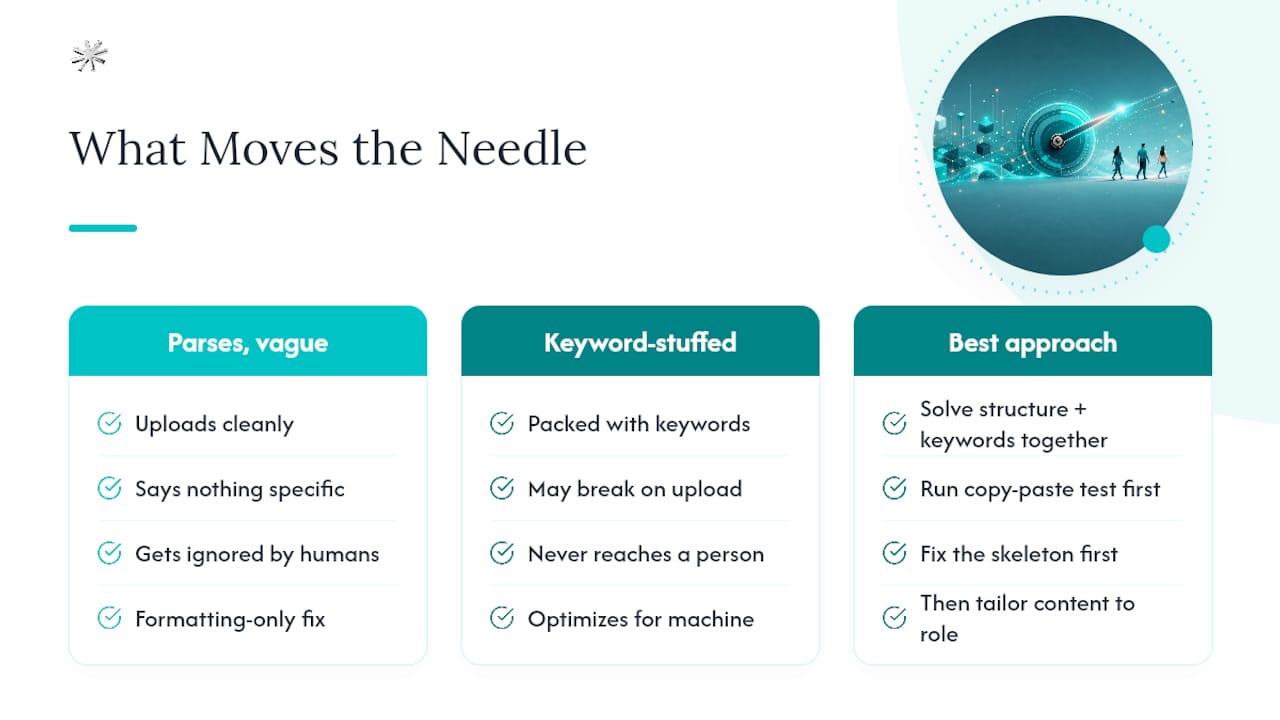
The conventional advice that annoys me most is the obsession with "beating the algorithm," as if the ATS were an adversary to trick. It's a filing system. Feed it clean structure and honest, specific language, and it does exactly what it's supposed to do: surface your resume to a person. The keyword-stuffing crowd optimizes for a machine that doesn't even make the hiring decision.
If you take one thing from this guide, prioritize the copy-paste test before you touch a single word of content. Structure problems compound. A broken layout undermines even a perfectly tailored resume, so fix the skeleton first, then spend your remaining time making the content specific to the role you actually want.
— Shane
Try NueCareer's Career Quiz and Resume Tools
If you're not sure which roles your resume should even be targeting, formatting fixes only get you so far. Nuecareer built the 7-Minute Career Quiz specifically for people who feel stuck between "update the old resume" and "figure out what I actually want next," matching your strengths to career paths you may not have considered before spending hours tailoring a resume for the wrong job.
Once you have a target role, Nuecareer's resume and cover letter tools help you build the content around it: summary examples, action verb lists, an objective writer for career changers, and a free ATS resume checker to confirm your document parses before you hit submit. The platform also includes 24/7 coaching chat and tailored job boards, so the resume work connects to an actual application strategy instead of sitting alone. Take the quiz, get matched to roles that fit, then use the resume tools to build a version worth submitting.
Sources
- Optimizing Your Resume for Applicant Tracking Systems | Columbia Career Education
- How To Write an ATS Resume (With Template and Tips) — Indeed
FAQ
What Is the ATS on a Resume?
An ATS, or applicant tracking system, is software that scans, sorts, and ranks resumes before a recruiter ever sees them, checking for formatting readability and keyword matches against the job posting.
Is an ATS-Friendly Resume Better Than a Designed One?
For most job applications, yes. A clean, single-column ATS-friendly resume gets read correctly by the software gatekeeper, while a heavily designed resume with columns or graphics risks getting scrambled or dropped before a human ever opens it.
Is a 72 ATS Score Good?
Scoring systems vary by tool, so a specific number means less than what's causing it. Run the free ATS resume checker or the copy-paste test to see exactly which formatting or keyword issues are dragging your score down, then fix those directly.
How Do I Know if My Resume Passes an ATS Scan?
Paste your resume into a plain text editor. If your contact info, job titles, and dates appear in a clean, correct order, your resume is likely parsing well.
What File Format Should I Use for an ATS Resume?
Use a .docx file or a text-based PDF you've confirmed by highlighting the text. Never submit a scanned image saved as a PDF, since it contains no readable text at all.