

The strongest teach.com alternatives available to U.S. educators in 2026 fall into two broad categories: resource and engagement platforms (free tools like Google Classroom, Kahoot!, and Padlet that plug into existing classrooms) and course creation and marketplace platforms (Teachable, Thinkific, Udemy, and Coursera for educators building or selling courses). Your best starting point depends on whether you need a tool that fits inside your current school setup or one that helps you build something of your own.
Here is a quick orientation across the full field:
- Free, K–12 focused: Google Classroom, Kahoot!, Canva for Education, Quizlet, Nearpod, Flipgrid, Quill, Flocabulary, Toddle, Padlet, Edmodo, Bento
- Interactive and collaborative: Figjam, Genially, Gamma, NotebookLM, Padlet
- Course creation (paid, business-oriented): Teachable, Thinkific, Kajabi, Podia, LearnWorlds, Pathwright
- Marketplaces (reach millions of learners): Udemy, Coursera, Alison
- LMS for institutions: Moodle, Canvas, TalentLMS, Thinkific Plus, Tovuti LMS, 360Learning, Speexx
Free tiers exist across most of these categories. Paid plans unlock course monetization, advanced analytics, and certification tools.
What are the best Teach.com alternatives for educators?
The 33 platforms below cover every major use case, from a first-grade teacher who wants livelier quizzes to a professional educator building a six-figure course business.
| Platform | Type | Free Option | Best For | Key Features |
|---|---|---|---|---|
| Google Classroom | Resource/LMS | Yes | K–12 educators | Google Workspace integration, assignments, grading |
| Kahoot! | Engagement | Yes (limited) | K–12 and remote engagement | Gamified quizzes, live games, reports |
| Canva for Education | Design | Yes | Visual lesson creation | Templates, infographics, slide decks |
| Padlet | Collaboration | Yes (limited) | Collaborative work | Virtual boards, multimedia posts |
| Quizlet | Study aid | Yes (limited) | Student revision | Flashcards, study sets, mobile app |
| Zoom | Video conferencing | Yes (limited) | Live online teaching | Breakout rooms, recording, screen share |
| Edmodo | Social LMS | Yes | K–12 classrooms | Assignments, messaging, community |
| Nearpod | Interactive lessons | Yes (limited) | Interactive delivery | Polls, quizzes, VR inside slides |
| Teachable | Course platform | Yes (limited) | Course creators | Drag-and-drop builder, payments, memberships |
| Thinkific | Course platform | Yes (limited) | Online course businesses | Course builder, marketing, community |
| Kajabi | All-in-one | No | Entrepreneurs | Email marketing, pipelines, memberships |
| Podia | Course platform | Yes (limited) | Simplicity-first creators | Courses, downloads, memberships |
| Udemy | Marketplace | Free to browse | Reaching large audiences | Marketplace exposure, analytics |
| Coursera | Marketplace/Certs | Yes (audit) | Professional development | University-backed certificates |
| Alison | Marketplace | Yes | Lifelong learners | Free courses, certificates |
| Quill | Writing tool | Yes | Language arts K–12 | Grammar, writing activities |
| Flipgrid | Video learning | Yes | Student voice | Video responses, peer feedback |
| Pathwright | Course design | No | Custom learning paths | Path builder, multimedia |
| Figjam | Whiteboard | Yes (limited) | Visual collaboration | Sticky notes, diagrams, templates |
| Gamma | Presentations | Yes (limited) | Creative presentations | AI-assisted design, dynamic slides |
| Bento | Lesson planning | Yes | K–12 workflow | Lesson organization, student interaction |
| Genially | Interactive content | Yes (limited) | Gamified content | Infographics, games, presentations |
| NotebookLM | AI study tool | Yes | Personal study | AI summaries, source-based Q&A |
| Flocabulary | Video/music | Paid | Engaging younger learners | Hip-hop videos, activities, quizzes |
| LearnWorlds | Course platform | No | Professional course creators | Interactive video, detailed analytics |
| Moodle | Open-source LMS | Yes | Academic institutions | WCAG 2.2 AA accessibility, IT integration |
| Thinkific Plus | Enterprise LMS | No | Large education businesses | Advanced customization, dedicated support |
| Speexx | Language training | No | Corporate language learning | Business language, coaching |
| Tovuti LMS | LMS | No | Business training | E-commerce, gamification |
| 360Learning | Collaborative LMS | No | Team-based learning | Peer content creation, analytics |
| Canvas | Academic LMS | Yes (limited) | Higher education | Integrations, community, grading |
| TalentLMS | Cloud LMS | Yes (limited) | Fast-setup training | Intuitive interface, scalability |
| Toddle | Curriculum tool | No | Curriculum management | Planning, assessment, reporting |
"The most effective ed-tech tools are those that change how students and teachers interact with content, not just how content is delivered." — The 74
Google Classroom remains the default starting point for most K–12 educators in the U.S. because it costs nothing and connects directly to Google Drive, Docs, and Meet. If your school already runs on Google Workspace, the setup takes minutes rather than days.
Kahoot! and Nearpod solve a specific problem: keeping students engaged during a lesson rather than just before or after it. Kahoot! wraps review sessions in a game format that students actually want to play. Nearpod goes further by embedding polls, open-ended questions, and even virtual field trips directly inside a slide presentation.

Canva for Education gives teachers free access to Canva's full premium design library, which is normally a paid feature. The practical use case is fast: build a visually clear worksheet, infographic, or slide deck in under 20 minutes without any graphic design background.
Quill deserves more attention than it typically gets. It focuses entirely on writing and grammar for K–12 students, using research-based activities that adapt to each student's skill level. For English Language Arts teachers, it fills a gap that general platforms like Google Classroom do not address.
Moodle sits in a different category from the consumer-facing tools above. It prioritizes data security and accessibility standards over rapid deployment, which makes it the right call for school districts and universities with strict IT requirements. Self-hosting Moodle requires technical resources, but the institutional control it provides is unmatched.
Platforms like Teachable, Thinkific, and Kajabi target educators who want to earn income from their expertise. Self-paced courses on structured platforms report up to 51% higher student completion rates compared to unstructured environments, which matters when your reputation depends on learner outcomes.

Pro Tip: If you are evaluating engagement tools, look for platforms that support live coaching, drip content delivery, and integrated payment management. These three features, together, are what separate a modern teaching platform from a basic content host.
How to choose the right platform for your teaching needs
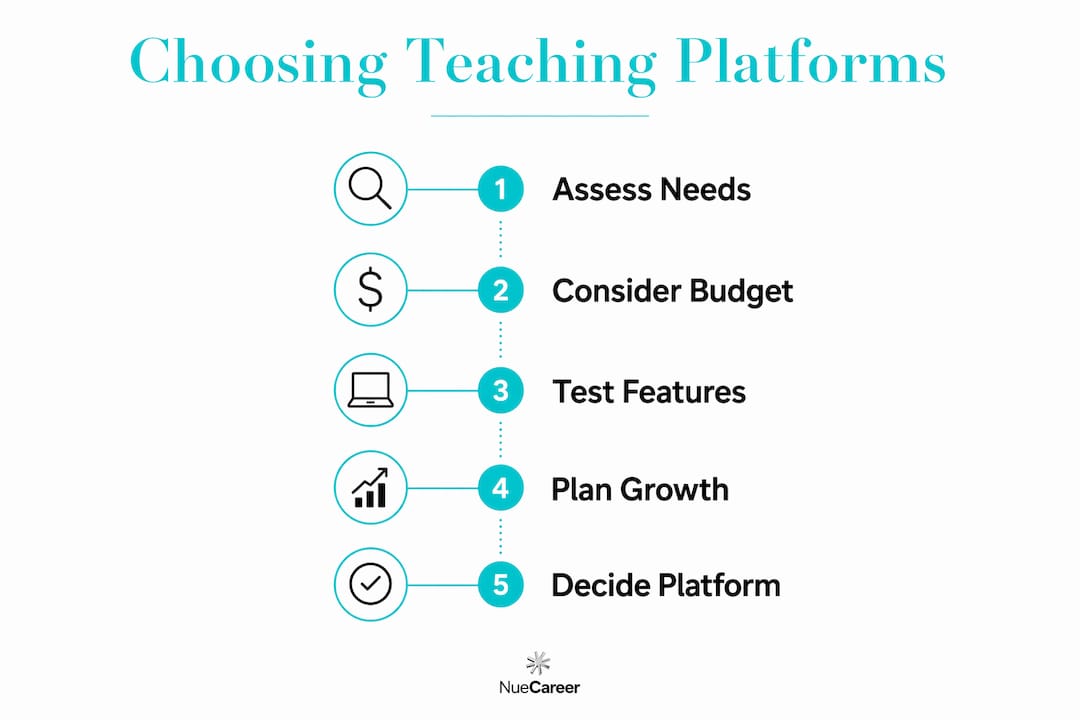
The right choice comes down to four questions you should answer before comparing features.
1. Who are you teaching? K–12 educators in a school setting need tools that comply with COPPA and FERPA, integrate with existing school systems, and work for students who may not have reliable devices at home. Google Classroom, Canvas, and Moodle are built with those constraints in mind. Course creators targeting adult professionals have far more flexibility.
2. What is your primary goal?
- Classroom engagement and formative assessment: Kahoot!, Nearpod, Flipgrid, Quill
- Content hosting and self-paced learning: Teachable, Thinkific, Podia, Pathwright
- Certification and professional credibility: Coursera, Alison, LearnWorlds
- Institutional LMS with full customization: Moodle, Canvas, TalentLMS, 360Learning
- Visual and collaborative work: Canva for Education, Padlet, Figjam, Genially
3. What is your budget? Start with free tiers. Google Classroom, Quill, Flipgrid, Alison, and NotebookLM are fully free for educators. Kahoot!, Quizlet, and Nearpod offer free plans with meaningful limitations. Kajabi, LearnWorlds, Pathwright, Speexx, Toddle, and Thinkific Plus have no free tier at all.
4. Do you need to scale? A solo educator building a side course business has different needs than a corporate training department onboarding hundreds of employees. Thinkific Plus, Tovuti LMS, and 360Learning are built for scale. Podia and Teachable are better suited to individual creators starting out.
Pro Tip: Before committing to any paid plan, run a free trial with real students or colleagues, not just a solo walkthrough. The friction points that matter most, such as login issues, mobile compatibility, and notification overload, only appear when actual learners use the platform.
Understanding how educational apps fit into a broader learning ecosystem can also help you avoid buying a tool that duplicates something you already have.
What do pricing models actually look like beyond "free vs. paid"?
Most platforms use one of four pricing structures, and knowing which model a platform uses tells you a lot about who it was built for.
Freemium with feature gates is the most common model. Kahoot!, Quizlet, Nearpod, and Canva for Education give you a usable free tier, then charge for analytics, advanced question types, or team features. These plans work well for individual teachers who only need core functionality.
Monthly or annual subscriptions are standard for course platforms. Teachable, Thinkific, and Podia charge per month (or less on annual billing) and take a transaction fee on lower-tier plans. Kajabi charges more but takes no transaction fee, which matters once your course revenue grows. LearnWorlds and Pathwright also use subscription models with tiered feature access.
Marketplace revenue share is how Udemy and Alison operate. You publish a course for free, and the platform takes a percentage of each sale. Alison reports a very large global learner base) and more than 6,000 courses, so the audience reach is real. The tradeoff is that you have limited control over pricing and branding.
Enterprise contracts cover Moodle (when hosted commercially), Thinkific Plus, Speexx, Tovuti LMS, 360Learning, and Canvas for institutions. Pricing is custom and negotiated, typically based on user count and feature requirements. These are not the right fit for individual educators, but they are the standard for school districts and corporate training teams.
Coursera sits in its own category. Individual learners can audit many courses for free, and Coursera Plus offers unlimited access to thousands of courses and Professional Certificates for an annual subscription fee. For educators who want to earn credentials rather than sell courses, Coursera Plus is one of the most cost-effective options available.
Extended options: which marketplaces and business platforms should you know about?
Educators who want to reach learners beyond their immediate classroom have three main marketplace options and four leading course business platforms worth understanding in depth.
Udemy, Coursera, and Alison each serve a different slice of the marketplace model. Udemy gives instructors maximum pricing flexibility and a large built-in audience, but competition is intense and discounting is aggressive. Coursera partners with universities and companies like Google and IBM to offer job-ready professional certificates, which carry real weight with employers. Alison's free model makes it accessible to learners in lower-income markets, which expands your potential audience considerably.
The choice between a marketplace and a standalone course platform often comes down to one question: do you want audience reach or audience ownership? LMS platforms offer full customization and data control, while marketplaces provide traffic but set the rules on pricing and content standards. Neither is universally better. An educator just starting out often benefits from marketplace exposure first, then migrates to a standalone platform once they have a proven course and an email list.
Teachable and Thinkific are the most popular entry points for educators building course businesses. Both offer drag-and-drop builders, payment processing, and student management without requiring any coding. Thinkific's free plan is more generous than Teachable's for new creators. Kajabi costs more but bundles email marketing, sales funnels, and membership management into one place, which removes the need for separate tools. Podia is the simplest of the four, with a clean interface that gets you selling within hours.
For educators who want detailed analytics and interactive video, LearnWorlds is worth the higher price point. It lets you add clickable hotspots, quizzes, and certificates directly inside video lessons, which is a feature most competitors do not offer at the same depth.
Pro Tip: Match your platform choice to your five-year goal, not your current situation. If you plan to build a course library and a community, Kajabi or Thinkific Plus will save you from migrating platforms later. If you are testing one course idea, start with Teachable or Podia and upgrade when the revenue justifies it.
You can also explore freelance and teaching platform options if you are considering offering tutoring or consulting alongside your course work.
Key Takeaways
The right platform depends on your teaching context, goals, and budget. Matching those three factors to the right tool is more reliable than chasing the platform with the most features.
| Point | Details |
|---|---|
| Start with free tiers | Google Classroom, Quill, Alison, and NotebookLM are fully free and cover most K–12 and personal study needs. |
| Marketplaces vs. ownership | Udemy and Alison offer audience reach; Teachable and Thinkific give you full control over pricing and student data. |
| Completion rates matter | Structured self-paced platforms report up to 51% higher student completion rates than unstructured environments. |
| Institutional needs differ | Moodle and Canvas prioritize accessibility standards and IT integration over rapid course sales. |
| Nuecareer for career transitions | Educators exploring new roles can use Nuecareer's career tools and coaching to identify strengths and apply with confidence. |
What most educators get wrong about choosing a platform
The conventional wisdom says to pick the platform with the best feature list. That framing leads most educators to either overspend on tools they will never fully use or underinvest in platforms that could genuinely grow their career.
The more useful frame is this: a platform is a commitment, not a purchase. Every hour you spend building content on Teachable is an hour that is harder to move to Kajabi later. Every student relationship you build on Udemy belongs to Udemy's ecosystem, not yours. These are not reasons to avoid those platforms. They are reasons to be honest about what you are signing up for before you start.
What gets underestimated consistently is the value of community and support. Platforms like 360Learning and Canvas have active user communities where educators share templates, troubleshoot problems, and build on each other's work. That kind of peer knowledge transfer, as research on teacher job satisfaction confirms, matters as much to long-term engagement as the platform's feature set. A tool you use confidently because you have a community behind you will always outperform a technically superior tool you use alone.
Free options are genuinely good in 2026. Google Classroom, Quill, and Alison are not consolation prizes for educators who cannot afford better. They are well-designed, widely supported, and actively developed. Start there, learn what you actually need, and then spend money on the specific gap that a free tool cannot fill.
Thinking about a career shift? Nuecareer can help you find your direction
Teaching builds a skill set that transfers further than most educators realize. If you are feeling stuck in your current role or curious about what else your expertise could support, Nuecareer was built for exactly that moment.
The 7-minute career quiz matches you to career paths built around your actual strengths, including paths you may not have considered. From there, Nuecareer gives you personalized roadmaps, a 24/7 coaching chat, and a job board tailored to your target roles. The built-in skills mapping tool helps you translate your classroom experience into language that resonates with hiring managers outside education. You do not need to have a plan yet. You just need a starting point.
FAQ
What is the best free online teaching platform?
Google Classroom is the most widely adopted free platform for K–12 educators in the U.S., offering assignment management, grading, and Google Workspace integration at no cost. Alison is the strongest free option for professional development, with over 50 million registered learners) and more than 6,000 courses available without a subscription.
What is the best free teaching app for teachers?
Kahoot! and Nearpod are the top free apps for in-class engagement, with Kahoot! excelling at gamified review and Nearpod embedding real-time polls and quizzes inside lesson slides. Both offer free tiers with meaningful functionality for individual teachers.
How can educators earn extra income through online platforms?
Teachable, Thinkific, and Udemy let educators monetize their expertise by building and selling self-paced courses, with structured platforms reporting up to 51% higher completion rates than unstructured alternatives, which supports stronger student reviews and repeat enrollment.
What is the best online teaching platform to work for?
Coursera offers the strongest professional credibility for educators who want to teach under an established brand, given its partnerships with universities and companies like Google and IBM. For full autonomy over content and pricing, Teachable and Thinkific are the leading independent options.
How do I choose between an LMS and a course marketplace?
Choose an LMS like Moodle or Canvas when you need institutional control, data security, and deep customization. Choose a marketplace like Udemy or Coursera when your priority is reaching a large audience quickly, accepting that the platform sets the pricing and content standards.